
Introduction
Picture a common scenario: you're promoting a mobile app and want to put a single link in your Instagram bio. But an iPhone user needs to land in the App Store, an Android user needs Google Play, and someone who opens the link from a computer should end up on your regular website. The old solution was simple but clunky: create several separate links and somehow manually steer traffic toward the right one, losing consistency and clean analytics in the process. Smart Links in Lix.li solve this differently: the exact same short link figures out on its own where a specific visitor should go. In this article, we'll cover how it works, why it matters, and how to set up a Smart Link yourself.
What Is a Smart Link
A Smart Link is a short link that sends different visitors to different destinations based on their country, device, operating system, or browser language. You set one default destination and add exception rules along the lines of "if such-and-such condition is met, go to this address instead." If no rule matches, the default destination applies. Nothing changes on the surface: you still share a single short link — in your bio, in an ad, on a business card, or in a QR code. But behind the scenes, that link automatically sorts your audience toward the right destination based on who exactly clicked it. This feature is especially useful for anyone promoting mobile apps, running international traffic, launching ads across different countries and platforms, or simply wanting to show different content depending on the visitor's device.
Which Signals Can Route Visitors
A Smart Link takes into account four visitor signals, all detected automatically:
| Signal | What it's based on | Example values |
|---|---|---|
| Country | Geolocation from the visitor's IP address | US, Germany, Russia, and around 100 others |
| Operating system | The device's OS | iOS, Android, Windows, macOS, Linux |
| Device | Device type | Smartphone, tablet, desktop |
| Browser language | The language set in the visitor's browser | Russian, English, Spanish, and others |
| All signals work the same way: there's a default destination, and rules that override it for specific conditions. |
How It Works
The logic behind a Smart Link rests on three principles:
- Default destination — the link's main URL. Every visitor who doesn't match any of the configured rules lands here.
- Rules — an ordered list of conditions in the form "if [signal] equals [value] → go to [address]." For example:
- If OS = iOS →
https://apps.apple.com/... - If OS = Android →
https://play.google.com/... - If Country = Germany →
https://shop.de
- If OS = iOS →
- The first match wins. For each visitor, rules are checked in order from top to bottom, and the first matching one applies — the rest are never considered. That's why rule order matters, and you can adjust it using the ↑ / ↓ arrows. Visitor signals are detected automatically at the moment of the click: country from the IP address, operating system and device type from browser data, language from the visitor's browser settings. You can add up to 10 rules per link.
Example: "the right app store"
One of the most common use cases is routing users to the correct app store based on their device:
| Visitor | Destination |
|---|---|
| iPhone owner | App Store |
| Android phone owner | Google Play |
| Desktop user | Regular website (default destination) |
 |
More Practical Use Cases
Geo-targeting without a pile of links
If a business has localized website versions for different countries — say, a German storefront priced in euros and an American one priced in dollars — you can set up a rule "if Country = Germany → German site version" and send everyone else to the default destination. Instead of maintaining a separate link for every region, you use just one — and share it in ads, on social media, or in email campaigns without tying it to a specific country.
The right page for every device
A mobile landing page is often built differently from a full desktop site: shorter, with bigger buttons, with a simplified sign-up form. A rule like "if Device = Smartphone → mobile version of the page" lets you show visitors exactly the version suited to their device, while still keeping everything on one short link.
Adapting by language
If your audience speaks different languages but happens to be in the same country (or geo-targeting doesn't fit for other reasons), you can route by browser language instead — for example, sending Spanish-speaking visitors to a Spanish version of your landing page.
How to Set Up a Smart Link: Step-by-Step Guide
Step 1 — Create or open a link
In the "My Links" section, create a new short link or open an existing one for editing. In the URL field, enter the default destination — this is where every visitor who doesn't match any rule will land.
Step 2 — Open the "Smart Link" section
Expand the "Smart Link" section in the creation or editing form. At the top, you'll see a "Default" card showing your main URL.
Step 3 — Add rules
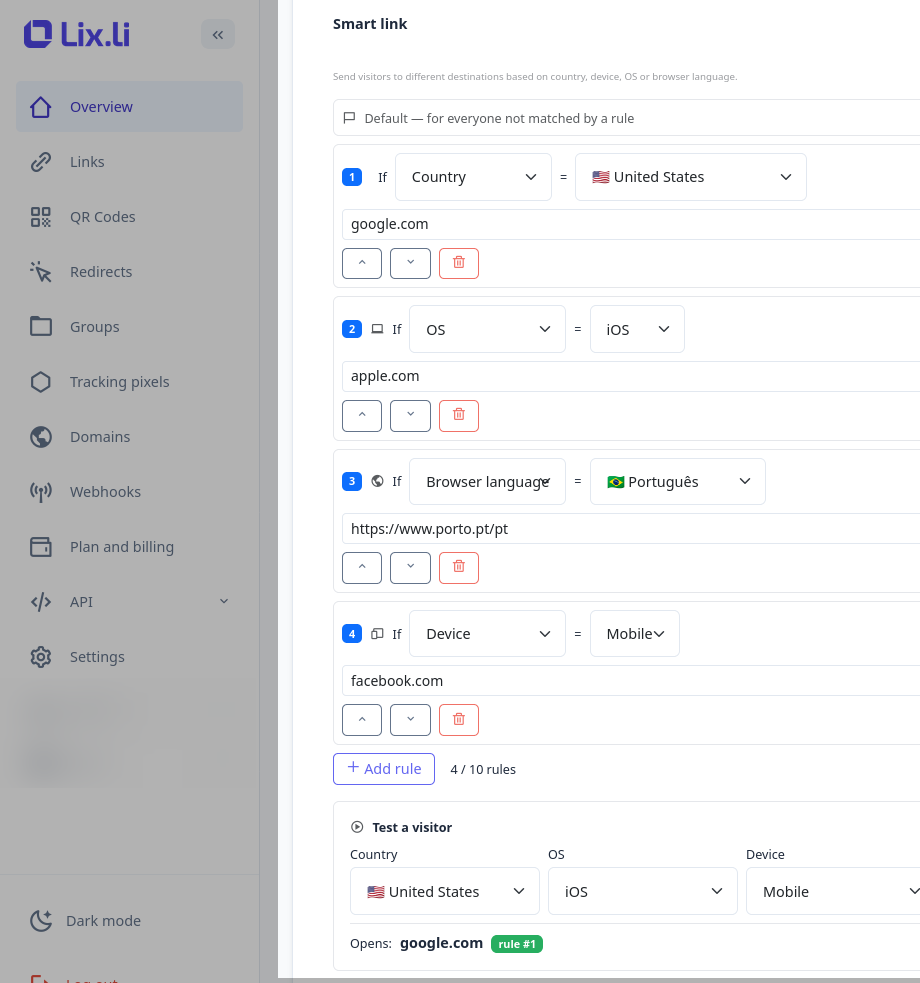
Click "Add rule" and build the condition as a phrase: "If [Country / OS / Device / Language] = [value] → [address]."
- Choose a signal — for example, OS.
- Choose a value — for example, iOS.
- Enter the destination for that case — for example, a link to the App Store listing.
- Add as many rules as you need (up to 10) and set their priority using the ↑ / ↓ arrows — keep in mind that rules are checked from top to bottom.
Step 4 — Check your setup in the built-in tester
At the bottom of the form is a tester: choose a visitor "profile" (country, OS, device, language), and you'll instantly see which destination they'd land on and which rule triggered. This lets you confirm the rule order is correct before the link goes live.
Step 5 — Save the link
Click "Save." That's it — you can now share a single short link anywhere, and it will automatically route different visitors to the destinations that make sense for them.
Compatibility with Other Lix.li Features
- Deep Links (opening in an app). Smart Links pair beautifully with this feature: the Smart Link first picks the right destination for a given audience segment, and the deep link then opens it directly in the app, if it's installed. The classic combo — "iOS → App Store, Android → Google Play, desktop → website" — works together automatically.
- A/B testing. Smart Links and A/B testing are mutually exclusive modes: only one can be active on a given link at a time. This is intentional — segmented, condition-based routing and random traffic splitting are fundamentally different tasks. Turning one mode on automatically turns the other off.
- Link passwords. The visitor enters the password first, and only then does the routing logic kick in.
- QR codes and statistics. A QR code points to the same link, so routing rules apply just as well when the code is scanned. In the link's statistics, you can see how many clicks went to each individual rule and how many went to the default destination.
Limitations and Important Nuances
- Geolocation is based on IP address. This is accurate at the country level, but as with any geo-targeting, a VPN or proxy can cause the system to detect a different country.
- Signals are detected automatically from the visitor's browser data. In rare cases — an unusual User-Agent or disabled headers — the operating system or device type may not be detected. In that situation, the default destination applies: this is a safe fallback, ensuring every visitor always ends up on a working page.
- Rule order determines everything. If two rules could theoretically match at the same time, whichever one is higher in the list wins. Use the built-in tester to check these situations.
- Only one routing mode per link — either a Smart Link or A/B testing, never both at once.
- A maximum of 10 rules per short link.
Frequently Asked Questions
Do I need to create separate links for different countries or platforms? No — that's exactly the point of this feature: a single link serves every audience segment you need at once. What happens if a visitor doesn't match any rule? They land on the default destination — the link's main URL. How exactly is a visitor's country determined? Automatically, via geolocation based on the visitor's IP address. Can I combine conditions — for example, set a rule for "iOS AND US" at the same time? In the current version, one rule corresponds to one condition. Compound conditions ("AND") may be added in a future update. In practice, correctly ordering your rules is often enough: place a narrower condition above a broader one. Can I use a Smart Link and A/B testing on the same link at the same time? No, only one mode works per link. Turning on a Smart Link automatically stops A/B testing, and vice versa. How many rules can I add to a link? Up to 10 rules per short link.
Conclusion
Smart Links let you show every visitor exactly what's relevant to them, all while sticking to a single short link across every piece of material. There's no need to maintain a whole zoo of separate links for each country, platform, or device type and manually decide who goes where — routing rules and the built-in tester do that work for you. For businesses promoting mobile apps, working with an international audience, or simply wanting to adapt a landing page to a visitor's device, this is a competitive edge that's rarely found in ordinary link shortening services.