Introduction
If you've ever set up an integration between two services — say, to automatically feed data from one system into a CRM or a Google Sheet — you've probably run into the term "webhook." It's one of those technologies quietly powering much of modern automation, from Slack notifications to order syncing in an online store. In this article, we'll break down what webhooks are in simple terms, how they differ from regular API requests, and how to set up click notifications for short links using webhooks in Lix.li.
What Is a Webhook, in Simple Terms
A webhook is a way for one service to automatically send data to another the moment a specific event happens. Instead of your system constantly asking "did anything new show up?", the service sends the data to your server itself, right when the event occurs. The easiest way to understand the difference is through a mail analogy:
- A regular API request is like walking to your mailbox yourself, over and over, to check if a letter has arrived.
- A webhook is like signing up for delivery: the letter shows up at your door on its own, the moment it's ready.
Technically, a webhook is just a regular HTTP request (usually
POST) that one server sends to a pre-configured URL on another server whenever the relevant event happens — an order payment, a task status change, or, in Lix.li's case, a click on a short link.
Why Webhooks Matter
Webhooks solve one specific problem: how to get up-to-date data without constantly polling an external service. Without webhooks, finding out about new events would mean regularly sending API requests — every minute, every five minutes — and checking each time whether anything new has shown up. That creates unnecessary load on both servers and always adds a delay between the actual event and the moment you find out about it. Webhooks flip that logic around: the service notifies you when something happens. This is especially useful for:
- Automating business processes — for example, automatically logging new leads into a CRM.
- Analytics integrations — feeding click data into your own tracking system.
- Bots and notifications — sending events to a Telegram bot or a team's Slack channel.
- Data syncing — updating Google Sheets, dashboards, or internal systems in real time.
How Webhooks Work: The Lix.li Example
In Lix.li, webhooks let you receive data about clicks on your short links directly on your own server — automatically, without needing to constantly poll the service's API. This is useful if you want to feed events into your CRM, an analytics system, Google Sheets, a Telegram bot, or any other automation system.
How It's Built
- Clicks aren't sent one at a time — they're collected and delivered in batches, once every few minutes. This reduces load on both your server and Lix.li's.
- Delivery happens close to real time, but not instantly — webhooks are designed for scenarios where a delay of a few minutes is acceptable, not for an instant reaction to every single click.
- Delivery is guaranteed on an "at least once" basis: if a network failure occurs during sending, a batch may arrive again. That's why every event has a unique
event_id— you should use it to filter out duplicates on your end.
Setting Up a Webhook in Your Dashboard
The webhooks feature is available on the Premium plan. Setup takes just a few steps:
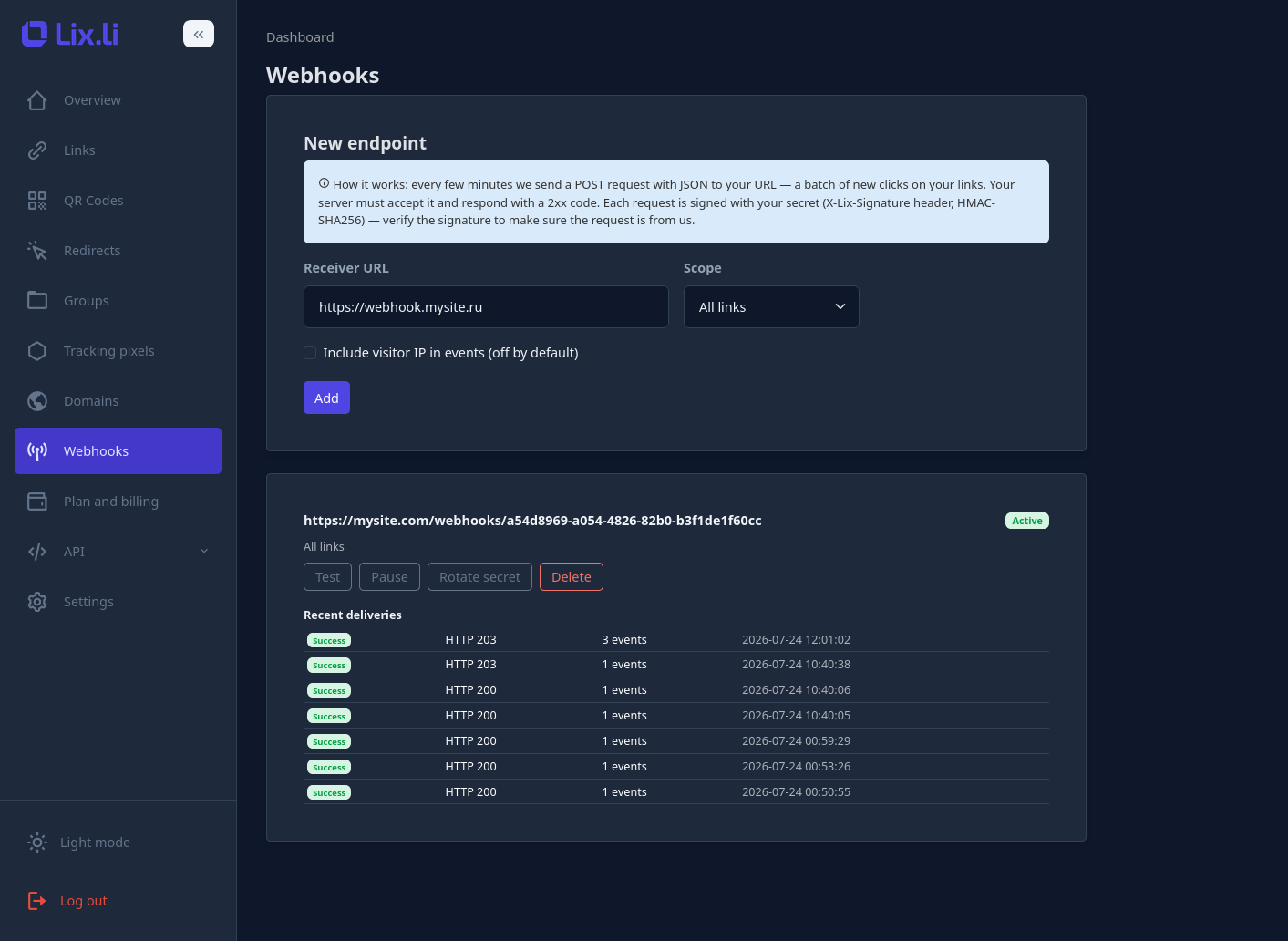
- Open the "Webhooks" section in your dashboard and click "Add."
- Provide:
- the receiver URL — the address on your server that will accept incoming requests (for example,
https://api.yoursite.com/webhooks/lix); - the scope — whether to send events for all links, a specific group of links, or just one link;
- whether to include the visitor's IP address in the event data (off by default, since it's personal data).
- the receiver URL — the address on your server that will accept incoming requests (for example,
- Right after creating the webhook, you'll be shown a secret key, displayed only once — make sure to save it, since it's used to verify the authenticity of incoming requests.
- Click "Test" — the service will send a test event and show whether your server responded correctly.
What Arrives at Your Server
Every request is sent using the POST method with a body in application/json format. Along with the data itself, the request includes a few service headers:
| Header | Purpose |
|---|---|
X-Lix-Signature |
The body's signature, in sha256= format — used for authenticity verification. |
X-Lix-Timestamp |
The time the request was sent, as a Unix timestamp. |
X-Lix-Delivery |
A unique delivery identifier. |
User-Agent |
Set to Lix-Webhooks/1.0. |
| The request body contains the batch of events itself: |
{
  "delivery_id": "0f3b9c2e-6a1d-4e88-9d5a-2f8c1b7a4e10",
  "event_type": "redirects.batch",
  "sent_at": "2026-06-01T12:05:00Z",
  "window": {
    "from": "2026-06-01T12:00:00Z",
    "to":   "2026-06-01T12:03:30Z"
  },
  "count": 2,
  "truncated": false,
  "events": [
    {
      "event_id":   "2ef7bde608ce5404e97d5f042f95f89f1c232871",
      "link_id":    12345,
      "datetime":   "2026-06-01T12:01:00Z",
      "country":    "US",
      "city":       "Boston",
      "browser":    "Chrome",
      "os":         "Windows",
      "device":     "Desktop",
      "ref_domain": "google.com",
      "group_id":   null,
      "is_bot":     false
    }
  ]
}
Each event within the batch includes the link ID, the click time in UTC, country, city, browser, operating system, device type, the domain the click came from, the group ID (if set), and a flag indicating whether it was a bot. The visitor's IP address is only included if you explicitly enabled that option when setting up the webhook.
If a large number of events have piled up, a batch may be flagged with truncated: true — this means part of the data will arrive with the next delivery, and nothing is lost.
How to Verify a Request's Authenticity
Since your server's URL can technically receive a request from anywhere, it's important to confirm that a request actually came from Lix.li and isn't spoofed. That's what the signature in the X-Lix-Signature header is for.
The verification principle: you take the "raw" (unprocessed) request body, compute an HMAC-SHA256 hash of it using your secret key, and compare the result with what came in the header. The comparison should be done in a secure way (constant-time) to prevent timing attacks.
PHP example:
$raw    = file_get_contents('php://input');
$secret = 'your_secret';
$expected = 'sha256=' . hash_hmac('sha256', $raw, $secret);
if (!hash_equals($expected, $_SERVER['HTTP_X_LIX_SIGNATURE'] ?? '')) {
    http_response_code(401);
    exit;
}
Node.js (Express) example:
const crypto = require('crypto');
// it's important to get the RAW body: app.use(express.raw({ type: 'application/json' }))
const expected = 'sha256=' + crypto.createHmac('sha256', secret).update(req.body).digest('hex');
const got = req.header('X-Lix-Signature') || '';
if (expected.length !== got.length ||
    !crypto.timingSafeEqual(Buffer.from(expected), Buffer.from(got))) {
  return res.sendStatus(401);
}
Python (Flask) example:
import hmac, hashlib
raw = request.get_data()  # raw bytes
expected = 'sha256=' + hmac.new(secret.encode(), raw, hashlib.sha256).hexdigest()
if not hmac.compare_digest(expected, request.headers.get('X-Lix-Signature', '')):
    return '', 401
Requirements for Your Receiving Server
For webhooks to work reliably, your server needs to follow a few rules:
- Respond with a
2xxcode. Any other code, or a timeout, is treated as a failure, and the delivery will be retried. - Respond quickly. You only have a few seconds to reply — avoid processing the data synchronously inside the request handler. The right approach: quickly save the incoming data (into a queue or a database, for example), return
2xx, and process it separately afterward. - Deduplicate by
event_id. Because of the retry mechanism, the same event can occasionally arrive twice. - Be idempotent. Reprocessing the same batch shouldn't corrupt your data.
- Always verify the signature on every incoming request.
- Use HTTPS. Local and internal addresses aren't supported for receiving webhooks.
What Happens on Failures
If your server doesn't respond with a 2xx code, Lix.li retries delivery with a gradually increasing delay between attempts. If the receiver doesn't respond at all for an extended period (many failed attempts in a row), the webhook is automatically paused to avoid sending data into the void. This is shown in the delivery log in your dashboard, and once you've fixed the issue on your end, you can turn the webhook back on.
Managing Webhooks in the Dashboard
For every configured webhook, the following actions are available:
- Test — send a single test event and immediately see the result: success, or the specific response code from your server.
- Pause / Resume — temporarily stop or resume delivery of events.
- Rotate the secret key — generate a new key to replace the old one; the old key stops working instantly, so make sure to update it on your end right away too.
- Delete — remove the webhook entirely.
- Delivery log — a history of recent deliveries, showing status, HTTP response code, number of events in the batch, and time sent.
Frequently Asked Questions
How quickly do events arrive?
In batches, roughly every few minutes, with a small processing delay. This isn't instant push delivery — it's a near-real-time scenario.
Can the same event arrive twice?
Yes, if a delivery is retried after a network failure. That's exactly why it's important to deduplicate events by the event_id field on your end.
Is a strict order of events guaranteed?
Within a single batch, events are ordered chronologically, but there's no strict guarantee of order between different batches — use each event's datetime field for sorting purposes.
What happens with very high traffic volumes?
If too many events accumulate within a single interval, the batch is flagged with truncated: true, and the rest of the data arrives with the next delivery — no data is lost in the process.
Is HTTPS required?
Yes, the receiver's address must start with https://. Local and internal addresses aren't accepted.
Can I receive events for just one link or a group of links?
Yes, when creating a webhook you can choose the scope "One link" or "Group" instead of all links in the account.
A Complete Handler Example in PHP
Here's a minimal but functional handler example that verifies the signature, responds quickly, and processes events with duplicate protection: