
Introduction
VK, short for VKontakte, is one of the largest social networks in Russia and the CIS region. A link to a post or discussion on VK rarely looks compact — it's usually an address like https://vk.com/wall-123456789_98765, with the group and post numeric identifiers stretching on for a good dozen characters. That kind of link is awkward to paste into a conversation, read out loud, or print on a business card.
In this article, we'll cover why you'd want to shorten VK links — whether it's a post, a group, a page, or a user profile — how to do it in seconds with Lix.li, and how to set up a link so it opens the VK app directly on a user's phone.
Why Shorten a VK Link
Compactness and convenience
A short link like lix.li/my-group fits into any message, is easy to say out loud in a video or a meeting, and doesn't look suspicious the way a long string of digits in a standard VK link can.
Click analytics
VK doesn't give you detailed statistics on who clicks your post or group link and from where, outside the platform itself. When you shorten a link through Lix.li, you get separate analytics for every click: the number of clicks, the user's country, device, and traffic source. This is especially useful if you're promoting your group across different channels — Instagram, email, ads — and want to understand where most of your traffic is coming from.
Your own branding
If you regularly share links to your VK group or page, a short link on your own domain (for example, go.yourbrand.com/vk) looks far more polished than a standard VK link and builds more trust with your audience.
Convenient for printed materials and QR codes
A short link to a group or post is easy to turn into a QR code and place on packaging, a business card, a banner, or in printed ads — unlike a long link, which is impossible to remember or fit neatly onto a small format.
How to Shorten a VK Link in Lix.li: Step-by-Step Guide
Shorten link
- Open the post, group, page, or profile on VK you want a link for, and copy its link (via the "···" menu → "Copy Link", or from the browser's address bar).
- Open the Lix.li link shortening service and paste the copied link into the input field.
- If you'd like, set a custom alias (for example,
lix.li/my-page) — this makes the link easier to remember and say out loud. - Click the shorten button — the service instantly creates a short link, ready to use.
- Copy the finished link and place it wherever you need it: in your bio, a post, an email newsletter, or on printed materials.
If you're already registered with Lix.li, the link is automatically saved to your dashboard, where click statistics are available, along with additional settings — such as a custom domain, a link expiration date, or a password for access.
How to Make a Link Open the VK App Directly
One of the most common frustrations: a user clicks a VK link on their phone, and instead of the app they already have installed, the mobile version of the website opens in a browser — with limited functionality and a login prompt. The deep link technology solves exactly this problem.
What is a deep link, in simple terms
A deep link is a short link that, when clicked, automatically opens the right app (VK, in this case) if it's installed on the user's device — and if it isn't, it simply opens the regular web version in a browser. The user doesn't have to choose anything manually: the link figures out on its own what's more convenient for them and takes them there instantly.
One nuance worth noting for VK links: on Android, the app always opens based on the address, while on iPhone, an exact deep link to a specific post or page isn't built yet — in that case, the web version opens instead. Still, simply skipping the extra intermediate screens already makes things noticeably more convenient for Android users.
How to enable a deep link for a VK link
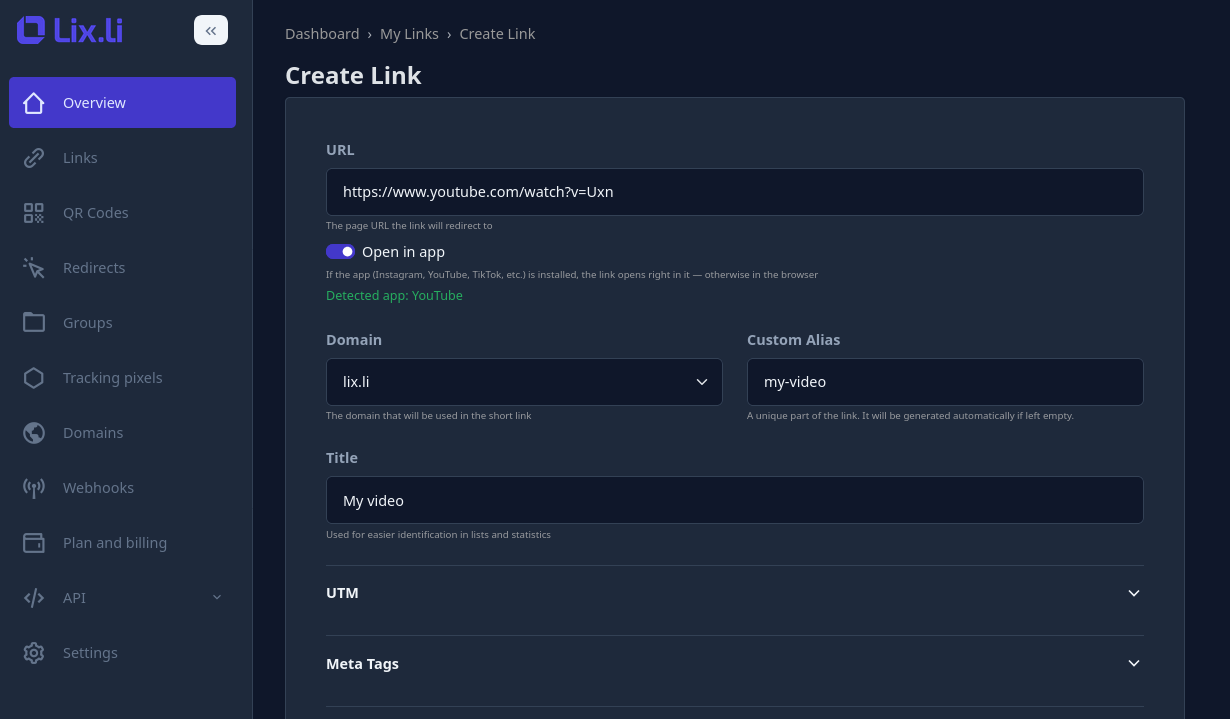
- When creating or editing a short link in Lix.li, paste the VK post, group, page, or profile address into the URL field.
- The service automatically recognizes that the link points to VK and offers to enable opening in the app.
- Turn on that setting — from then on, the link will automatically open the VK app on Android devices where it's installed, and the regular web version on iPhone, a computer, or where the app isn't installed.
For more on how this technology works across different devices and which other apps are supported, check out our article What Is a Deep Link and How Does It Work.
Conclusion
Shortening a VK link is a simple way to make it more convenient for your audience and get useful click analytics that the platform itself doesn't provide. With Lix.li, you can shorten a link to a post, group, page, or profile in seconds, and set it up to automatically open the VK app on a user's phone — with no extra steps on their end and no loss of convenience.